Introduction

Easy Skill Tree Engine v1.00
Build powerful and customizable skill trees in your project for Gamemaker.
Features
Skill Tree Engine is a library that can be imported into a GameMaker project to design and implement functional skill trees that apply effects to in-game actions and trigger immediate effects on unlock.
Includes:
- Plot skill node coordinates by Rank and Position
- Assign max levels, sprite images, and costs to a node
- Set prerequisite conditions before a node can be levelled
- Apply permanent or instant effects on level-up
- Lock specific nodes based on set requirements
- Choose level-up styles: instant, hold, or deferred
- Allow items to boost skill levels
- Appearance options for tree layout, skill nodes and lines
- Support multiple trees that can be switched and interacted with
About
Developed by BrentBruthaa (Fat Pint Games) and is compatible with GameMaker 2023.x+ or newer.
Requires support for:
- Structs and constructors
- Anonymous functions and method binding
- Modern JSON handling
- Runtime reflection (
is_struct, variable_struct_exists, etc)
Licence
The Easy Skill Tree Engine is developed and owned by Fat Pint Games.
Use of the Skill Tree Engine is subject to the End User License Agreement (EULA) provided with the product at the time of purchase via itch.io.
The license grants permission to use the source code in personal and commercial projects, but does not permit redistribution or resale of the source code, whether modified or unmodified.
Setup
Import the library, add the manager object, configure macros, and start defining trees.
Getting Started
Add the Source Files into your project
- Import the Easy Skill Tree Engine library
.yymps package into your project.
Create the skill tree manager object
- Place the persistent object
obj_skill_tree in an initial room, or create it during game setup.
Edit macros
- Open the
ESTE_MACROS script file.
- Read each macro comment, and set the parameters you want for your game.
Create skill trees to use in your game
- Create a new script file for your tree definitions.
- See Creating a Skill Tree and SkillNode sections to build your own skill trees.
Macro Configuration
The below macros allow for a range of customization for the behaviour of your skill trees. Read through them and adjust as necessary to produce the kind of skill tree you're trying to make.
| Macro | Default Value | Purpose |
|---|
SKILLTREE_OBJECT | obj_skill_tree | The skill tree manager object name |
SKILLTREE_ARRAY | SKILLTREE_OBJECT.skill_tree_array_ | Points to the array containing all the skill trees for the purpose of getting all skill and stat values |
SKILLNODE_DEFAULT_COST | [["global","skill_points",1,"SP"]] | The default cost to perform a level up action if no other cost is specified |
PLAYERLEVEL_VARIABLE | global.player_level | The variable holding the player's level which is referenced in player level prerequisites and updating locks |
ITEM_ARRAY | global.item_list | The array holding the catalogue of available items |
LEVEL_UP_ACTION_SOUND | snd_node_level_up | Sound when levelling a node |
SKILLTREE_DEBUG_MODE | true | Enable debug keystrokes during testing |
INPUT_CONTROL_TYPE | controller_type.keyboard | Starting controller type used to navigate tree. Keyboard type also includes gamepad input. |
SKILLNODE_FRAME_SPRITE | spr_node_frame | The background sprite used for skill nodes |
SKILLNODE_FOCUS_SPRITE | spr_node_frame_focus | The sprite that draws over a node to show it’s being focused |
SKILLNODE_LOCK_SPRITE | spr_node_locked | The sprite to indicate that a skill node is locked |
SKILLNODE_ICON_SIZE | 64 | Set this macro to the draw size of your nodes |
SKILLNODE_DRAWX_OFFSET | 0 | Global X offset for nodes |
SKILLNODE_DRAWY_OFFSET | 0 | Global Y offset for nodes |
SKILLNODE_USE_FOCUS_SPRITE | true | Use sprite (vs shape) to show focus |
SKILLNODE_FOCUS_STANDARD_COLOUR | c_white | Blend colour of focus sprite |
SKILLNODE_FOCUS_OSCILATION_TIME | 1.2 | Amount of seconds it takes for the focus frame to grow and shrink |
SKILL_PANEL_ENABLE | true | Allows for a description panel to be activated when a node is selected and included in boundary calculations |
SKILL_PANEL_WIDTH_RATIO | 0.225 | Percentage of screen width that makes the description panel (left and right side) |
SKILL_PANEL_HEIGHT_RATIO | 0.225 | Percentage of screen width that makes the description panel (top and bottom side) |
SKILL_PANEL_ALWAYS_OPEN | true | Sets whether the description panel is always visible or slides out when not focused on a node in mouse controller mode |
SKILL_PANEL_UNLOCKREQ_ONLYMISSING | true | The description panel will show only what is still required to unlock a skill. Set to false to show everything that is required whether it's already achieved or not |
SKILL_PANEL_LOCKED_SHOW_NAME | false | Show the skill name for locked nodes in the description panel |
SKILL_PANEL_LOCKED_SHOW_DESC | false | Show the description for locked nodes in the description panel |
SKILL_PANEL_SHOW_COST | true | Show level-up cost in the description panel |
SKILL_PANEL_DRAW_NEXTLEVEL_DESC_ON_MAX | false | show the skill description for the next level when the skill's current level >= it's maximum level |
LERP_TO_SCROLL | true | Scroll smoothly when scrolling through tree. Disable to snap to position |
SKILLNODE_ORDER_SPACING | 1.8 | Spacing ratio of nodes within a rank |
SKILLNODE_RANK_BUFFER_RATIO | 2.5 | Spacing ratio of nodes between ranks |
NODE_DRAW_ITEM_LEVELS | true | When drawing skill levels on a node, this macro will separate level values earned from items and level up actions |
NODE_DRAW_COST | false | Draws the cost of performing a level up action on the nodes themselves |
NODE_DRAW_LINES | true | Draw lines between nodes |
NODE_DRAW_LINE_TRIANGLES | true | Draw triangles on lines |
NODE_LINE_WIDTH | SKILLNODE_ICON_SIZE / 6 | Thickness of lines drawn between nodes |
SKILL_DRAW_COST_ONLY_IF_NOT_DEFAULT | true | OIf NODE_DRAW_COST or SKILL_PANEL_SHOW_COST is true, only draw the cost if it is not the same as the default cost specified in SKILLNODE_DEFAULT_COST |
SKILL_ALLOC_HOLD_TIMER | 1.0 | Time in seconds to level up a skill in HOLD allocation mode |
EDGE_SCROLL_X_RATIO | 0.02 | Spacing ratio of screen at edges that scrolls the nodes horizontally |
EDGE_SCROLL_Y_RATIO | 0.04 | Spacing ratio of screen at edges that scrolls the nodes vertically |
EDGE_SCROLL_SPEED | 10 | Speed that nodes scroll when mouse is at screen edges |
SCROLLING_BACKGROUND | true | Enable scrolling background |
SKILLNODE_SCROLL_BUFFER_RATIO | SKILLNODE_ICON_SIZE * max(SKILLNODE_ORDER_SPACING, SKILLNODE_RANK_BUFFER_RATIO) | Allow scroll if nodes fall outside the screen edge minus this buffer |
ENCRYPTION_KEY_XOR | "FatPintGames_EasySkillTreeEngine" | Export encryption key (change this) |
Understanding Skill Trees and Skill Nodes
A Skill Tree is the canvas; Skill Nodes are the abilities placed on it.
Basics
A Skill Tree contains all the rules that will apply to all nodes in that tree such as its orientation, layout, etc.
A Skill Node represents a single ability that can be learned and levelled when requirements are met.
The creation of a skill tree consists of 4 primary steps
- Create the tree using the constructor
new SkillTree(...)
- Create nodes using the constructor
new SkillNode(...)
- Add Skill Nodes to the Skill Tree
- Push the Skill Tree to the tree array (default:
obj_skill_tree.skill_tree_array_)
Orientation
SkillTree variable: orientation_
Variable Type: Numeric/Enum
Enum Options:
orientation.vertical_bottom_uporientation.vertical_top_downorientation.horizontal
Each Skill Tree has an orientation, either Horizontal or Vertical. If a Skill Tree’s orientation is set to orientation.vertical_bottom_up, skill ranks will be drawn to the screen from bottom to top.
If the Tree’s orientation is set to orientation.vertical_top_down, the ranks will be drawn to the screen from top to bottom.
If the Tree’s orientation is set to orientation.horizontal, the ranks will be drawn to the screen from left to right.
Typically, consistency with orientation across all skill tree orientations is more common in commercial games, however you can set each Skill Tree’s orientation separately.
Ranks & Order
SkillNode variables: rank_, order_
Variable Type: Real
A Skill Tree displays Skill Nodes in “Ranks”. Typically, skills that are created in rank 0 are available from the beginning or in the earliest stages of the game. As skills are levelled up and specific criteria are met, skills on higher ranks can be accessed.
In a vertical bottom up skill tree, rank 0, order 0 is drawn at the bottom center of the screen and higher ranks are drawn above.

In a vertical top down skill tree, rank 0, order 0 is drawn at the bottom center of the screen and higher ranks are drawn below.
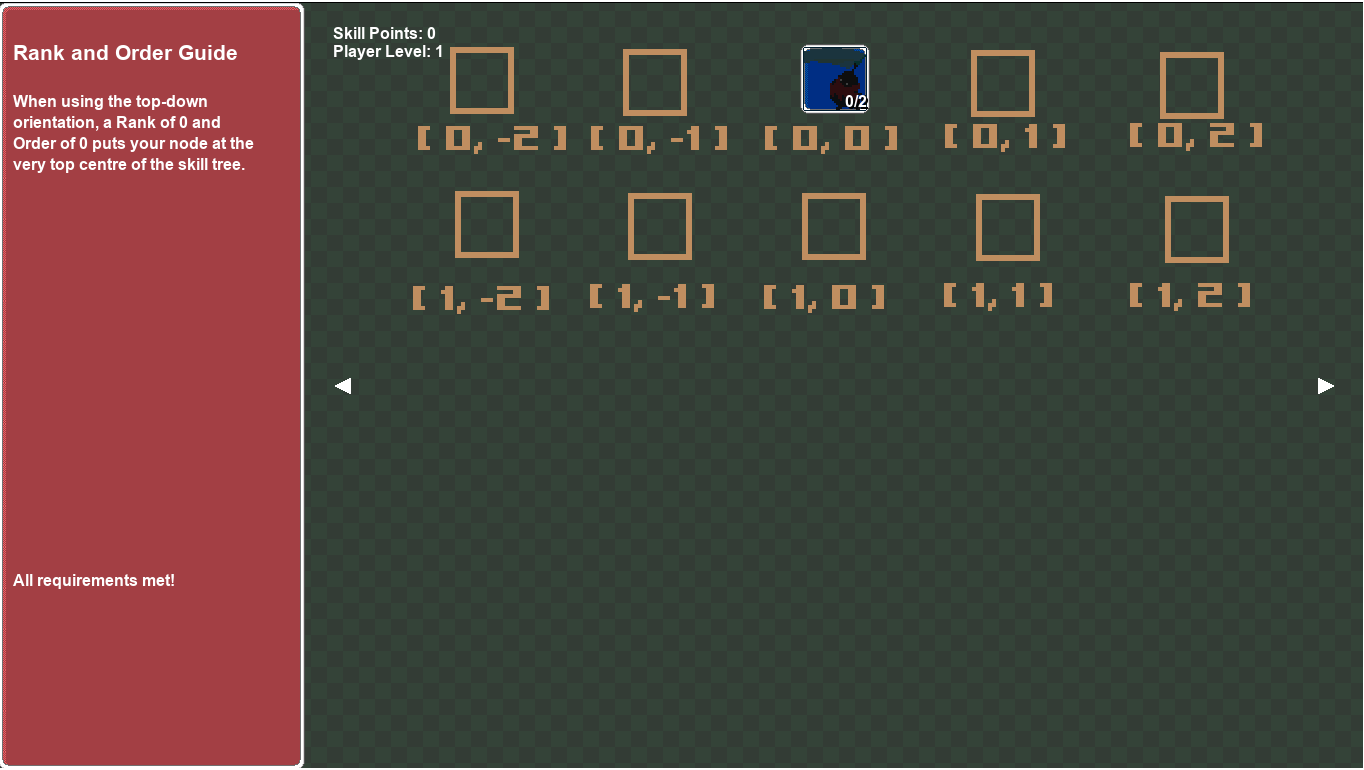
In a horizontal skill tree, rank 0 is drawn at the left of the screen and higher ranks are drawn to the right.
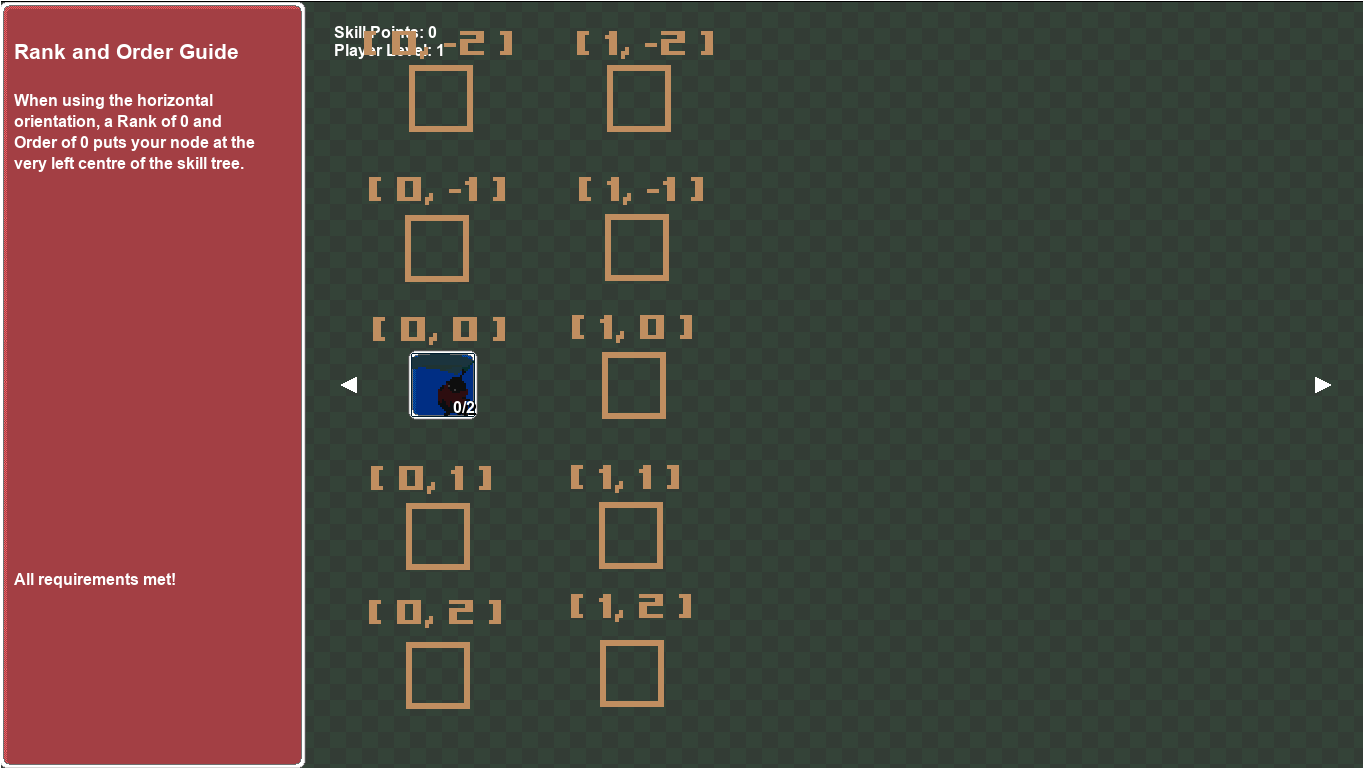
Although the first rank is identified by rank “0” in code, in game the smallest rank is referred to as rank “1” (for readability of the player)
Each skill in a rank is drawn in its “Order” Value.
The Order value of 0 represents the position in the very centre of the rank. In a vertical orientation, an Order value of -1 represents the Skill Node position to the left of the centre and an Order value of 1 represents the Skill Node position to the right of the centre position.
In a horizontal orientation, an Order value of -1 represents the Skill Node position just above the center position and an Order value of 1 represents the Skill Node position just below the centre position.
You can assign an order that is not a whole number to have it drawn at an offset
You can also assign an rank that is not a whole number to have it drawn at an offset however this is not recommended as different functions check ranks and the correct rank data needs to be supplied
A node's rank should not be below 0, this will cause it to not be in focus when drawn on screen
Layout
SkillTree variable: layout_
Variable Type: Numeric/Enum
Enum Options:
layout.standardlayout.symmetrical
Each skill tree also has two layout options. A layout can be set to either layout.standard or layout.symmetrical. If a Tree’s layout is set to layout.symmetrical, it will draw skills on a rank in a symmetrical fashion where it is able to.
So for example if a rank contains two skills at order positions 0 and 1, the symmetrical layout will adjust those nodes to be drawn at order -0.5 and 0.5.
Otherwise, in a standard layout, nodes will be drawn with respect to it’s exact Rank and Order values.
Skill Levels
SkillNode variable: current_level_
Variable Type: Numeric
A skill node is assigned a Current Level which by default is set to 0. When a skill is levelled up for the first time by paying its cost, its current level is set to 1. Skill Nodes provide the capability to improve player functions like player stats or skill stats with each level.
For example: Imagine a skill node that grants the ability “Fireball” that inflicts 5 damage and applies the status effect “Burn” for 5 seconds. Levelling up this Skill Node again to level 2 can improve the performance of the Fireball skill to now inflict 8 damage and apply Burn for 7 seconds.
Cost
SkillNode variable: cost_
Variable Type: Array or 0
Default Value: [["global","skill_points",1,"SP"]]/p>
Each skill node has a cost requirement in order to level up. By default the cost of a Skill Node is set to ‘1 Skill Point’. This is indicated by the cost array that uses global.skill_points as the currency pool for levelling up skill nodes. The term “SP” is used to abbreviate the currency name and is displayed in game.
As a developer, you might decide that skill costs may vary such that a skill can become more expensive per level. The cost array can be updated as an instant effect to levelling a node.
You might also decide that a skill should cost 30 gold from a global.gold variable instead of a skill point. That is also achievable by setting the cost_ variable as: [["global","gold",30,"GP"]]
You might want to apply multiple costs to level up a skill such that a skill should cost 1 skill point, 30 gold and 3 royal tokens (from a separate global.royal_tokens variable). That is also achievable by setting the cost_ variable as:
cost_ = [
            ["global","skill_points",1,"SP"],
            ["global","gold",30,"GP"],
            ["global","royal_tokens",3,"RT"]
        ];
Ensure that all variables used as costs are accessible when attempting to level up a node to prevent crashes
So for example if your cost is set to [[obj_player, "gold", 30, "GP]]
but your player object is deactivated during a pause, then trying to access this variable will cause a crash
Finally, you can specify that there is ‘no cost’ to level up a skill node by just setting the cost_ value to 0 instead of an array. A skill node that has ‘no cost’ is still subject to other level, rank, tree requirements.
A Skill Node can only be levelled up if the player has the specified cost available.
Note: If your cost is referencing a global variable, the first argument can be written as global instead of "global". Writing it as a string is only an option to ensure the cost can be serialized when choosing to export your tree to a file.
Max Level
SkillNode variable: max_level_
Variable Type: Numeric
Each skill has a Maximum Level. If the current_level_ of a Skill Node is equal to the max_level_, then the player cannot perform any more level up actions on that skill.
The current_level_ of a Skill Node cannot exceed the max_level_, however it is possible for a node’s effective level to exceed it’s Max Level using items.
Item Level
SkillNode variable: item_level_
Variable Type: Numeric
Items have the ability to add additional item levels to Skill Nodes to increase its overall effective level to its current_level_ + item_level_. By equipping items, a Skill Node’s effective level can exceed its Max Level.
Advanced Skill Node Concepts
Prerequisite Nodes
SkillNode variable: prerequisites_
Variable Type: Array
Prerequisite conditions can be applied to a node to prevent it from being levelled up until all requirements are met. One of these requirements is to assign “Prerequisite nodes” or “Parent Nodes” that must first reach a minimum level (current_level_).
Rank Requirements
SkillNode variable: rank_requirements_
Variable Type: Array
Another condition that can be applied to a Skill Node is a rank requirement. A node with a rank requirement cannot be levelled up until nodes on the required rank has collectively been levelled up the amount of times specified in the requirement.
So for example, you can have a skill on rank 1 having the requirement that a level up action was completed successfully 3 times amongst the skills on rank 0 before it can be levelled up itself.
Player Level Requirement
SkillNode variable: player_level_required_
Variable Type: Numeric
Another condition that can be applied to a Skill Node is a player level requirement. A node with this type of requirement cannot be levelled up until the player’s level has reached a minimum value specified by the requirement.
Tree Point Requirement
SkillNode variable: tree_points_required_
Variable Type: Numeric
The final type of condition that can be applied to a Skill Node is a Skill Tree Point Requirement. This requirement specifies that this Skill Node cannot be levelled up until the minimum amount of level up actions have been completed collectively across all nodes on the focused skill tree.
Requirement Combinations
It’s possible to combine multiple requirement types on a single Skill Node. So for example, you can specify that the “Fireball” skill cannot be levelled until:
- Prerequisite node 'Fire Bolt' has reached level 2
- At least 4 level up actions have been completed on rank 0
- The player is at least level 5
Level up actions cannot be peformed on a node until all the level up requirements have been met
Immediate Effects
SkillNode variable: immediate_effects_
Variable Type: Array (containing structs)
A skill node can trigger an immediate effect the moment a node is levelled up. This involves modifying a single or multiple variables to communicate to your game that your player now has a specific ability. This can also directly modify a player stat or any currently existing variable.
A function can be executed upon a skill level up to make the ability more tailored to the developers vision.
Stat Formulas
SkillNode variable: stat_formulas_
Variable Type: Struct
Stat formulas hold specific values and necessary calculations relevant to the skill tree. For example, your “Fireball” skill has the following description:
“Inflicts 5 fire damage and applies the status effect “Burn” for 5 seconds.”
The stat formula struct would hold the calculations to determine how much fire damage is inflicted by the fireball and how long the burn status is applied for in seconds.
A linear stat formula could simply state that for every level, the fire damage is increased by 5 and the burn duration is increased by 1 second.
So when this fireball skill is levelled up to level 3, it will then show the description:
“Inflicts 15 fire damage and applies the status effect “Burn” for 7 seconds.”
And will behave as such.
Level Overrides
SkillNode variable: level_overrides_
Variable Type: Struct
Level overrides can be applied to a skill node to completely override a value that will be returned from a stat formula for a specific level. For example:
Your “Fireball” skill as above should increase its fire damage by 5 every level. By level 3, the skill would normally inflict 15 fire damage. By applying a level override, you can specify that when this skill reaches level 3, it will ignore the stat formula’s 15 damage and instead will inflict a different value that you specify in the override (Perhaps 11 damage).
A single override is applied to a single stat for a single level. So if you want to override the damage and duration on multiple levels, the level and value at each override level will need to be specified.
Active Trees
SkillNode variable: active_
Variable Type: Boolean
A skill tree has an active status which determines whether stat values can be derived from nodes in the tree.
Say for instance you have two skill trees that contain levelled up nodes affecting the player’s strength stat. Whenever you swing your sword, your game will check your total strength bonus from all active trees. If one of those two skill trees is set to active_ = false then when you perform the stat bonus check, it will only return bonuses from the active skill tree.
A Skill Node that is inactive is also automatically set to invisible.
Tree Visibility
SkillNode variable: visible_
Variable Type: Boolean
If a skill tree is set to invisible, it cannot show when switching between skill tree pages in the menu. Being invisible doesn’t prevent bonuses being derived from a skill tree. For example:
Say you’re making a roguelike game where you earn gold each run. In your main menu you have a “bonus” skill tree where you can spend your currency to level up nodes and unlock bonuses.
When your main game starts, this main menu skill tree will be set to invisible, but is still active. You won’t be able to change it during your run, but you’ll still have bonuses from the skill tree applied.
Locks
SkillNode variable: locks_
Variable Type: Array
The locks_ array in a skill node contains a list of node IDs that will become locked once the current skill node has a level up action performed on it.
This can be use to create ‘Either-Or’ options where the player will have to choose a path to take, but choosing one path can lock another one.
Lock Status
SkillNode variable: locked_
Variable Type: Boolean
A Skill Node that has its locked_ status set to ‘true’ cannot have any level up actions applied to it regardless if all other requirements are meant. A node that is locked is different to being unlocked and not having requirements met.
A node, once locked will typically be unavailable to the player (with an exception of a level based lock) and is by default drawn with the lock icon overlaying it.
Important Skill Tree Methods
addNode(_node)
Arguments:
| Name | Data Type | Purpose |
|---|
_node | Struct | Contains all node data made from the SkillNode constructor |
Add a SkillNode to the tree.
setVisible(_is_visible)
Arguments:
| Name | Data Type | Purpose |
|---|
_is_visible | Boolean | Sets the tree to either Visible or Invisible |
Set tree visibility in UI.
SetActive(_is_active)
Arguments:
| Name | Data Type | Purpose |
|---|
_is_active | Boolean | Sets the tree to either Active or Inactive |
After a Skill Tree has been created, it’s active status can be set. Stat bonuses cannot be granted from a skill tree that is inactive. Trees that are set to inactive status are also set to invisible and cannot be viewed by scrolling through skill trees.
setDefaultFocusedNode(_id)
Arguments:
| Name | Data Type | Purpose |
|---|
_id | String | When switching to a skill tree, the default focused node will be the one with the ID supplied |
After skill nodes have been created and added to the skill tree and the tree has been added to the skill tree array, one of the nodes added to the tree can be selected as the default as the default node. The default node will be focused on whenever switching to view that skill tree.
So say for instance you have a node in the center of your tree that you want to be in focus as you switch your view to the skill tree, instead of having a node on the edge be focused, you would call this function and pass through the ID of your center node.
If the node ID supplied does not match one of the skill node IDs in the tree or is left as undefined, the default focused tree will be the one with the lowest rank and order.
Important Skill Node Methods
addPrerequisite(_node_id, _required_level)
Arguments:
| Name | Data Type | Purpose |
|---|
_node | Struct | Contains all node data made from the SkillNode constructor |
_required_level | Numeric | The minimum level the prerequisite node must be to allow this node to level up |
Immediately after creation of the skill node, this method can be called to populate a node’s prerequisites_ array. This will prevent any level up actions on this skill node until all prerequisite nodes have met their minimum required level.
addPlayerLevelRequirement(_level)
Arguments:
| Name | Data Type | Purpose |
|---|
_level | Numeric | The minimum level the player must be before any level up actions can be performed on this node |
Immediately after creation of the skill node, this method can be called to set the node’s player_level_required_ variable. This will prevent any level up actions on this skill node until the player’s level has reached the minimum required specified level.
addTreePointRequirement(_points)
Arguments:
| Name | Data Type | Purpose |
|---|
_points | Numeric | The minimum number of level up actions on the focused tree before any level up actions can be performed on this node |
Immediately after creation of the skill node, this method can be called to set the node’s tree_points_required_ variable. This will prevent any level up actions on this skill node until the player’s level has reached the minimum required specified level.
setLevel(_level)
Arguments:
| Name | Data Type | Purpose |
|---|
_level | Numeric | Manually set the current level of a skill node |
Any time after a skill node has been created, you can manually set the current_level_ of a node with this function. You may want to create a skill tree where a single point has been pre-assigned to a basic skill at the beginning of the game.
lockNodesUponLevelUp(_node_id_array)
Arguments:
| Name | Data Type | Purpose |
|---|
_node_id_array | Array | Array containing all node ids that will be locked when this node is levelled up |
After creation of the skill node, this method can be called to set the node’s locks_ array. When this node is levelled up, all nodes with corresponding IDs in the tree will have their locked_ status set to true. Preventing the player from performing any level up actions on the locked node.
This function can be useful in giving your players a choice between one or many skills.
applyPlayerLevelLock(_player_level)
Arguments:
| Name | Data Type | Purpose |
|---|
_player_level | Numeric | Player level that must be attained before the node’s locked status is set to true |
After creation of the skill node, this method can be called to set the node’s locked_ value to true, preventing your player from performing a level up action while they are below the specified level.
When the player level reaches the value supplied in this function, the node’s locked_ value will be set to false, if it is not being locked by any other node.
Creating a Skill Tree
4 Step Summary
As mentioned earlier, the creation of a skill tree mainly consists of 4 main steps:
- Create the tree:
new SkillTree(...)
- Create nodes:
new SkillNode(...)
- Add nodes to the tree
- Push tree to the tree array (macro
SKILLTREE_ARRAY)
It may be helpful to create a new function per skill tree to conduct all the above steps with one function call. For example:
function skill_tree_initialize_offensive_abilities() {
  // define tree & nodes and push to array
}
Step 1 - New Skill Tree
The SkillTree constructor creates a new instance of a skill tree that accepts a number of arguments when called.
Arguments:
| Name | Data Type | Default | Purpose |
|---|
_id | String | N/A | Give an ID to reference the tree |
_description | String | "" | Give a description to the skill tree |
_orientation | Numeric/Enum (orientation.vertical_top_down, orientation.vertical_bottom_up, orientation.horizontal) | orientation.horizontal> | Choose whether the tree is drawn horizontally or vertically |
_layout | Numeric/Enum (layout.standard, layout.symmetrical) | layout.standard | Choose between the standard layout or symmetrical |
_panel_side | Numeric/Enum (dir.right, dir.up, dir.left, dir.down) | dir.right | Choose the side of the screen that the skill description panel will be showing on |
_background | Sprite Index | Undefined | Pick a background to show behind the skill tree |
_image_index | Numeric | 0 | Image index of the _background sprite to display |
An example call to create a new skill tree can look like this:
tank_defensive_tree = new SkillTree(
  "t_defensive",
  "Skills focused on increasing defensive capabilities",
  orientation.vertical_bottom_up,
  layout.standard,
  dir.down,
  spr_tree_background,
  1
);
This above example will create a new skill tree called “t_defensive” with a vertical orientation and store it in the variable tank_defensive_tree. The tree is stored in this variable so we can add it to the skill tree array once all nodes have been added.
Step 2 - Create Skill Nodes
The SkillNode constructor creates a new instance of a skill node that accepts a number of arguments when called.
Arguments:
| Name | Data Type | Default | Purpose |
|---|
_id | String | N/A | Give an ID to reference the node |
_name | String | N/A | Give a name to the skill |
_rank | Numeric | N/A | The rank that the skill node is positioned in |
_position_in_rank(order) | Numeric | N/A | The position of the node in the rank (0 being the center) |
_max_level | Numeric | N/A | Max amount of level up actions allowed on this rank |
_sprite | Sprite Index | N/A | The sprite to be drawn on the node |
_image_index | Numeric | N/A | The image index of the sprite to be drawn on the node |
_cost | Array | SKILLNODE_DEFAULT_COST | The cost to perform a level up action. |
_immediate_effects | Array | [] | Any effects that occur whenever a level up action is performed |
_stat_formulas | Struct | undefined | Stat bonuses that are provided by this skill tree |
_level_overrides | Struct | undefined | Any level overrides to the stat formulas provided |
_description | String | "" | A text description of the skill |
An example call to create a new skill node can look like this:
//Rank 0

  td_0_0_hp_up = new SkillNode(
    "td_0_0_hp_up",
    "Reinforced Armor",
    0, -0.5,
    3,
    spr_node_icons, 0,
    SKILLNODE_DEFAULT_COST,
    [
      { op:"add", context:"global", path:"player_max_health", value:1 },
      { op:"add", context:"global", path:"player_health",     value:1 }
    ],
    { player_max_hp: "linear(1)" },
    {},
    "Increase max hp by { player_max_hp }."
  ).applyPlayerLevelLock(3);
This code created a new SkillNode which is stored in the variable td_0_0_hp_up (which is the same name as it’s ID). This is so we can reference this node when we eventually add it to the skill tree we created.
The arguments passed through each section of this skill node are explained below:
| Argument | Notes |
|---|
_id | This constructor has created a new SkillNode with the id “td_0_0_hp_up”. A meaningful unique name was assigned as the id. “td” refers to the tank defensive tree, 0_0 refers to the first node on the first rank. “hp_up” is a simple description of the skill. |
_name | The name “Reinforced Armor” was given to this skill and will be displayed on the description panel when highlighted. |
_rank | This skill was created on rank ‘0’. So it will be one of the earlier skill able to be learned in this skill tree. |
_position_in_rank(order) | The position was assigned as ‘-0.5’. This node will not be in the centre position of the rank but rather a bit to the left (since the tree it’s going to be added to is a vertical tree). If the node was to be placed in the very centre, the position would be 0. But if there is an even number of nodes in the rank, it might be desirable not to have a node directly in the center. |
_max_level | This node was assigned a max level of 3 meaning it can have up to 3 level up actions performed on this node at a maximum. |
_sprite | The sprite index ‘spr_node_icons’ was selected to draw the skill’s image on the skill node. |
_image_index | The image index of 0 was passed through. So the sprite that will be drawn is the first image index on spr_node_icons. |
_cost | The default value was passed through in the cost argument, meaning the default value of 1 skill point from global.skill_points is the cost to perform a level up action on this skill node. |
_immediate_effects | The immediate_effects_ array was populated with one immediate effect. When a level up action is performed on this skill, the global variable global.abilities[abilities.lucky_dodge] will be set to true. |
_stat_formulas | A stat formula was created with a stat named lucky_dodge_chance. This stat was assigned a curve where each level’s stat value was provided. 0.3 at level 1, 0.5 at level 2 to a maximum of 0.8 at level 5.
Even though the max level of the skill is 3, the stat value caps at level 5 in case any items would push the skill’s level beyond it’s max level of 3.
Because the formula used was ‘curve’ even if the node’s level was boosted beyond level 5 with items, the bonus provided by the stat formula would not exceed the highest value provided (0.8). |
_level_overrides | Nothing was passed through the level overrides argument, meaning a function call to retrieve the current stat bonus from this skill will always calculate from the stat formula. |
_description | The skill description was set as "Increase max hp by { player_max_hp }." When the skill is highlighted in game, { player_max_hp } will be replaced in the description string with the current skill bonus (or the bonus at level 1 if it has not yet had an initial level up action performed) |
Before adding this node to the skill tree, a second skill node will be created using the SkillNode constructor again.
td_1_1_lucky_dodge = new SkillNode(
  "td_1_1_lucky_dodge",
  "Lucky Dodge",
  1,-0.5,
  3,
  spr_node_icons,8,
  SKILLNODE_DEFAULT_COST,
  [
    { op:"set", context:"global", path:["abilities", abilities.lucky_dodge], value:"true" }
  ],
  { lucky_dodge_chance:"curve(0.3,0.5,0.7,0.75,0.8)" },
  {},
  "When getting hit by an enemy, {name} provides a {%lucky_dodge_chance}% chance to avoid taking damage"
).addPrerequisite("td_0_0_hp_up",1);
This code created a new SkillNode which is stored in the variable td_1_1_lucky_dodge (which is the same name as it’s ID). This is so it can be referenced by this value when we eventually add it to the skill tree we created.
The arguments passed through each section of this skill node are explained below:
| Argument | Notes |
|---|
_id | This constructor has created a new SkillNode with the id “td_1_1_dodge”. A meaningful unique name was assigned as the id. “td” refers to the tank defensive tree, 1_1 refers to the second node on the second rank (rank 1). “dodge” is a simple description of the skill. |
_name | The name “Lucky Dodge” was given to this skill and will be displayed on the description panel when highlighted. |
_rank | This skill was created on rank ‘1’. So it will be drawn on the rank after the rank with the Reinforced Armour skill node. |
_position_in_rank(order) | The position was assigned as ‘-0.5’. Which is the same as the Reinforced Armour skill. So this node will be positioned above the previous skill on the skill tree. |
_max_level | This node was assigned a max level of 3 meaning it can have up to 3 level up actions performed on this node at a maximum. |
_sprite | The sprite index ‘spr_node_icons’ was selected to draw the skill’s image on the skill node. |
_image_index | The image index of 8 was passed through. So the sprite that will be drawn is the ninth image index on spr_node_icons. |
_cost | The default value was passed through in the cost argument, meaning the default value of 1 skill point from global.skill_points is the cost to perform a level up action on this skill node. |
_immediate_effects | The immediate_effects_ array was populated with two immediate effects. When a level up action is performed on this skill, global.player_max_health will increase by 1 and global.player_health will increase by 1. Further details about how to structure these effects will be explained below |
_stat_formulas | A stat formula was created to indicate that the stat named player_hp is increased by a linear amount (1) for each level up action completed. More details about how to setup stat formulas will be explained below |
_level_overrides | Nothing was passed through the level overrides argument, meaning a function call to retrieve the current stat bonus from this skill will always calculate from the stat formula. |
_description | The skill description was set as "When getting hit by an enemy, {name} provides a {%lucky_dodge_chance}% chance to avoid taking damage"
When the skill is highlighted in game, the part of the description written as {name} will be replaced with the name of the skill.
the part of the description {%lucky_dodge_chance} will be replaced with the current skill bonus (or the bonus at level 1 if it has not yet had an initial level up action performed).
Because there is a % symbol before the stat name within the braces, the text shown in the description will be formatted as a percent instead of the value in the stat formula. So at level 1 the description will read:
“When getting hit by an enemy, there is a 30% chance to avoid taking damage”
|
After creating the skill node, the method addPrerequisite() is called to add the “Reinforced Armour” skill at level 1 as a prerequisite to be able to perform any level up actions on “Lucky Dodge”.
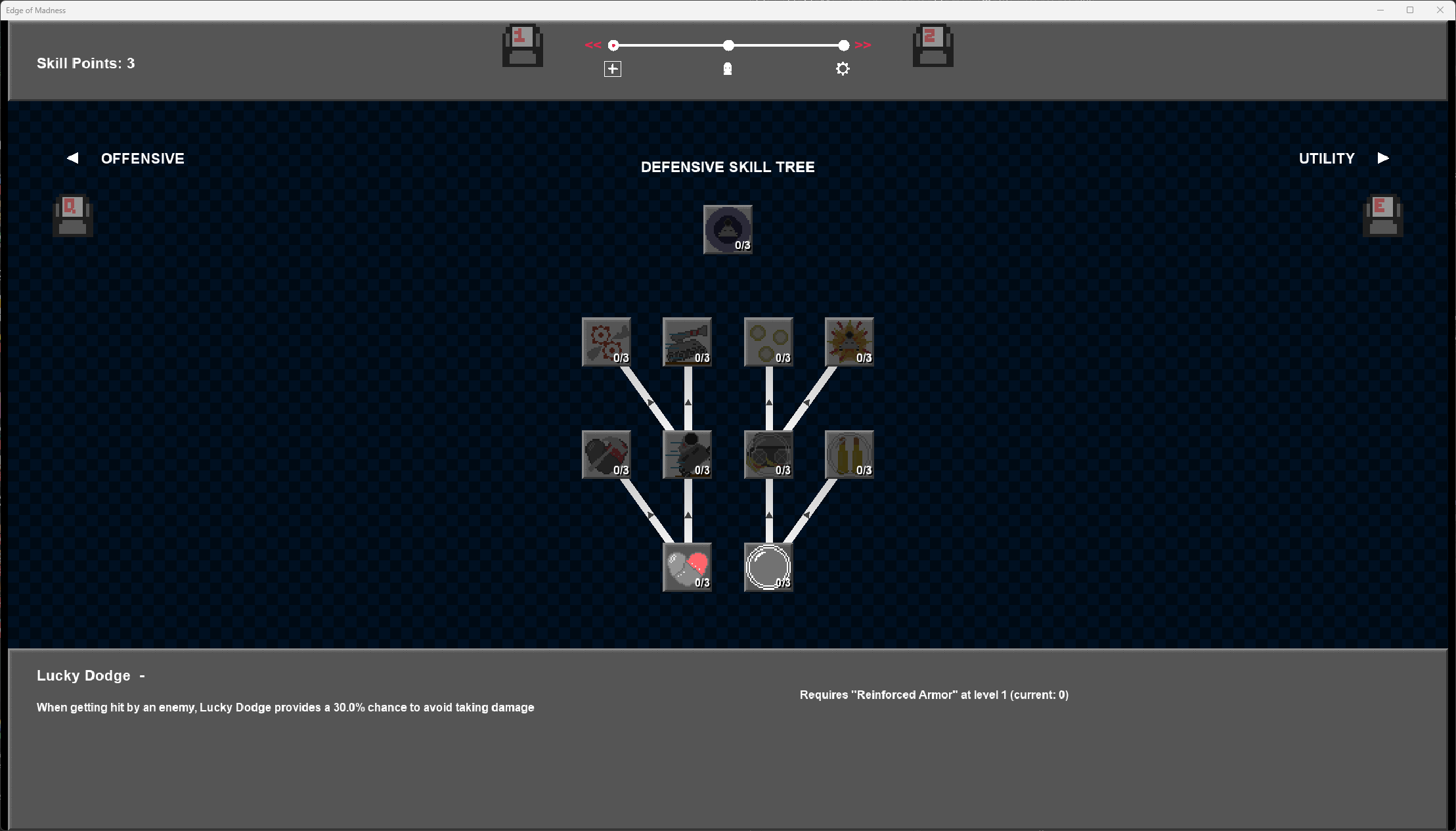
Step 3 - Adding Nodes to a Tree
After nodes have been created, it’s really simple to add them to the skill tree.
If nodes were created and assigned to a struct variable like this:
root_node = new SkillNode(
	"c_attack_1",		//node id
	"Basic Attack",	//name
	0, 0,	  //rank, order (position in rank)
	5,      //max level of skill
	spr_node_icons, 0,,,	//sprite icon and frame
  {		//skill formula
		weapon_multiplier: "linear(1.7)"	//stat increases by 1.7 each level
	},
	_overrides,		//apply level overrides
	"A simple melee strike that deals {weapon_multiplier}x weapon damage." //skill description
	).setLevel(1);
Then nodes can be added to a tree by calling the addNode() function for the tree and passing through the node struct variable names like this:
combat_tree.addNode(root_node)
.addNode(node1)
.addNode(node2)
.addNode(node3)
And continue until all the nodes you’ve made have been added to the tree.
Although as an alternative, nodes can be added to the skill tree immediately upon creation like this:
combat_tree.addNode( new SkillNode(
  "c_attack_1",		//node id
	"Basic Attack",	//name
	0, 0,           //rank, order (position in rank)
	5,  //max level of skill
	spr_node_icons, 0,,,	//sprite icon and frame
  {	 //skill formula
		weapon_multiplier: "linear(1.7)"	//stat increases by 1.7 each level
	},
	_overrides,		//apply level overrides
	"A simple melee strike that deals {weapon_multiplier}x weapon damage." //skill description
	).setLevel(1)
)
Step 4 - Add the Tree to the Array
When all the skill nodes have been added to a skill tree, you can add that tree to your skill tree manager object’s skill tree array with the built in GameMaker function array_push:
array_push(SKILLTREE_ARRAY, combat_tree);
Once the tree has been added to the skill tree array, it can be viewed, navigated through and stat bonuses can be derived from it.
Stat Formulas
Stat formulas provide a bonus to a specific stat and can increase (or decrease) as the player increases the level of the skill node.
Consider a skill node with a stat formula where the intended bonus is to grant 2 strength per skill node level. There are multiple ways you can achieve this. The two main methods of creating stat formulas are by either creating a function that will return the desired value. Or by using the engine’s “Easy Notation” that can turn readable strings into a function that produces the same effect.
To create this stat bonus using functions, it could be created like this:
{ strength: function(_level){ return _level * 2; } }
The same effect can be achieved through “Easy Notation” by creating it as:
{ strength : “linear(2)”}
Both of the above options have the same effect.
Another example would be to manually set the return value at each level. To achieve this via a function, it could be created as:
 {
  strength :  function(_level) {
		switch (_level) {
			case 0:
			case 1: return 3;
			case 2: return 7;
			case 3: return 17;
			case 4: return 30;
			default: return 63;
		}
  }
The same effect can be achieved through “Easy Notation” by creating it as:
{ strength : curve(0,3,7,17,30,63)”}
“Easy Notation” options you can use are as follows:
| Notation | Effect | Example |
|---|
"linear" | Return value * level | "linear(3.5)" |
"linear_from" | Return value * level once the node reaches the target level. Target level is the first argument. Linear value is the second. | “linear_from(3, 0.35)” |
"constant" | RReturn a constant value | "constant(10)" |
"constant_from" | Return a constant value once the node reaches the target value. Target level is the first argument. Constant value is the second. | "“constant(3, 0.5)” |
"curve" | Specify return values per level | “curve(2,3,5,6,12)” |
"stat_formula_add" | Add two values together | “stat_formula_add(constant(5), linear(3))” |
"stat_formula_sub" | Subtract two values | “stat_formula_sub(constant(100), linear(10))” |
"stat_formula_mult" | Multiply two values | “stat_formula_mult(curve(1,5,9), linear(1.2))” |
"stat_formula_div" | Divide two values | “stat_formula_div(constant(40), linear(3))” |
Easy Notation can also be nested. So you can have a linear check and a curve check within a stat_formula_add
Export note:
Exporting and Importing skill trees is not a required to develop a game using the Easy Skill Tree Engine. If this feature is something you want to use, it is important to note that functions and function names cannot be serialized into a .dat or .json file. Using functions in stat formulas, immediate effects or skill costs will cause the export to create an inaccurate build of your tree. It's therefore advised to use the easy notation in your stat formulas
Items
The ability to create items and have them influence your skills and stat bonuses have been included in the Easy Skill Tree Engine.
Basics
Items can be created in the ITEM_ARRAY to act as a catalogue of equipment. Like skill nodes, items also have stat bonuses and immediate effects that can be set to trigger upon equipping.
An item can be created in a similar fashion as a skill node, except they don’t need to be attached to a skill tree. The constructor can be called and the item can be pushed into the ITEM_ARRAY.
Skill Node Boosts
Item variable: skill_node_boosts_
Variable Type: Struct
An item can boost skill nodes to increase a skills overall effectiveness. So if your game has a skill with a stat formula that increases player strength by 5 per level and its max level is 3. An item that has this skill in its skill_node_boosts_ struct can increase that node’s item_level_, so if the node boost contained 1 level, then that skill node with a max level of 3 will be at an effective level of 4, granting 20 overall strength.
Immediate Effects
Item variable: immediate_effects_
Variable Type: Array (containing structs)
Just like skill nodes, an item can trigger an immediate effect the moment it is equipped. Item immediate effects work exactly the same as a skill node, so you may update a variable or execute a function to create any type of desired effect to occur when the item is equipped.
Stat Modifiers
Item variable: stat_modifiers_
Variable Type: Struct
Items hold stat modifiers, similar to how skill nodes hold stat formulas. However stat modifiers are always a constant amount regardless of item level, unless the value is manually updated.
If an item and a skill node share the name of a stat bonus, then calling the function stat_bonus_get_total(“_stat_bonus_name”) will return the total stat bonus from items and skill nodes combined.
If you need to get stat bonuses specifically from items without including bonuses from skill nodes, you can use the function stat_bonus_get_from_items(“_stat_bonus_name”)
Important Item Methods
equipItem() and unequipItem()
Arguments: none
Equipping an item will check for any skill node boosts attached to the item and apply item levels accordingly. It will also trigger onEquip() which will complete any immediate effects attached to the item.
Unequipping an item will reverse any skill node boosts that were granted to a skill when this item was equipped.
getFormattedDescription()
Arguments: none
This function will return the description_ string of the item. As items will generally reference stat formula values and skills, it will replace {stat_formula_name} with the corresponding skill name as well as skill names or percentages when preceded with a % sign.
Creating An Item
An item can be created by calling it’s constructor directly. It is important to add the created item to the ITEM_ARRAY so that item related functions can recognise and interact with the item.
The SkillItem constructor creates a new instance of an item that accepts several arguments when called.
| Name | Data Type | Default | Purpose |
|---|
_id | String | N/A | Give an ID to reference the item |
_name | String | N/A | Name of the item as seen by players |
_level | Numeric | 1 | To be used as you deem necessary |
_rarity | Numeric / Enum rarity.common, rarity.rare, rarity.epic, rarity.legendary | rarity.common | To be used as you deem necessary |
_character_array | Array | [] | To be used as you deem necessary |
_sprite | Sprite Index | N/A | Used to visually identify the item |
_img_index | Numeric | N/A | Used to show the correct image from the sprite |
_description | String | N/A | Used to show the item’s effect to the player |
_immediate_effects | Array | [] | Triggers an effect immediately upon equipping the item |
_stat_modifiers | Struct | {} | Stat bonuses granted to the player while equipped |
_skill_node_boosts | Struct | {} | Skill Node item level boosts that are applied while the item is equipped |
Examples
An example call to create a new item can look like this:
array_push(ITEM_ARRAY, new SkillItem(
	"swordsman_common_0",			//item id
	"Whetstone",				//item name
	1,					//item level
	rarity.common,				//item rarity
	[class.swordsman],			//characters who can pick up item
	spr_item, 0,				//sprite and image index
	"Increase attack damage by {atk_dmg}",	//item description
	,					//no immediate effect
	{
		atk_dmg : 10			//item grants flat bonus
	}
	,					//no skill boost
));
The above example will create a new item with the id “swordsman_common_0” named “Whetstone”. This example also pushes the item to the ITEM_ARRAY immediately upon creation so that it can be interacted with by item related functions. When equipped this item will simply grant a stat bonus named atk_dmg with a constant value of 10.
Another example to show an item that will grant a skill boost to an item would look like this::
array_push(ITEM_ARRAY, new SkillItem(
	"shared_rare_0",			//item id
	"Oak Talisman",				//item name
	1,					//item level
	rarity.rare,				//item rarity
	[class.swordsman. class.monk],		//characters who can pick up item
	spr_item, 1,				//sprite and image index
	"--Skill Boosts:-- \n{l1_2_2_atk_spd}\n{l3_5_0_mp}",	//show skill names in description
	,					//no immediate effect
	{},					//no stat bonus
	{
		"l1_2_2_atk_spd" : 2,		//grant 2 levels to this ability
		"l3_5_0_mp" : 1			//grant 1 level to this ability
	}));
Useful Functions
The below useful functions can help you get the most out of the Easy Skill Tree Engine
Getters and Setters
is_skill_tree(_struct)
Returns: Boolean
Arguments:
| Name | Data Type | Purpose |
|---|
_struct | Struct | Checks this value to see if it is a valid skill tree struct |
Return whether the passed through struct is a valid skill tree struct
is_node(_struct)
Returns: Boolean
Arguments:
| Name | Data Type | Purpose |
|---|
_struct | Struct | Checks this value to see if it is a valid skill node struct |
Return whether the passed through struct is a valid skill node struct
tree_find_by_id(_id)
Returns: Skill Tree (Struct) or Undefined
Arguments:
| Name | Data Type | Purpose |
|---|
_id | String | Searches the Skill Trees in the Skill Tree Array to return the one with the supplied ID |
Returns the skill tree struct with the ID provided. If a tree with the provided ID isn't found, the function returns undefined.
node_find_by_id(_id)
Returns: Skill Node (Struct) or Undefined
Arguments:
| Name | Data Type | Purpose |
|---|
_id | String | Searches all skill trees to find the skill node with this ID |
Returns the skill node struct with the ID provided. If a node with the provided ID isn't found, the function returns undefined.
node_get_level(_tree_id, _node_id, _current_only = false)
Returns: Numeric
Arguments:
| Name | Data Type | Purpose |
|---|
_tree_id | String | The function will search the provided tree for the skill node |
_node_id | String | The function will search the provided node to return the level |
_current_only | Boolean | If set to true, the function will only return the current_level_ without item boosts. Else it will return the skill's effective level. |
Returns the current level of a skill node. If a valid skill node is not found, it will return 0.
node_get_selected()
Returns: Struct
Arguments: None
Returns the node struct of the currently selected skill node in the current focused skill tree.
set_focused_tree(_tree)
Returns: N/A
Arguments:
| Name | Data Type | Purpose |
|---|
_tree | Struct | Uses the supplied Skill Tree to set as the currently focused tree. |
Sets the tree supplied in the argument as the selected tree to be viewed and navigated.
The tree struct can be obtained with the tree_find_by_id() function
tree_visible_exists()
Returns: Boolean
Arguments: None
Returns whether there are any trees that are visible. (It's visible_ variable is set to true)
skill_point_add(_amount)
Returns: N/A
Arguments:
| Name | Data Type | Purpose |
|---|
_amount | Numeric | adds the amount supplied to the player level |
Adds the amount supplied to the player level
skill_cost_pool_add(_path, _source, _amount)
Returns: N/A
Arguments:
| Name | Data Type | Purpose |
|---|
_path | Struct (global or instance), (* Can also be "global") | used to search for the variable supplied |
_source | String | The variable name to modify |
_amount | Numeric | The value to add to the cost pool |
Adds a specified amount to a variable used as cost pool to unlock a node.
For example, if you use global.gold to level up a node, you could use skill_cost_pool_add(global, gold, 1) to add 1 gold to the cost pool variable.
stat_bonus_get_total(_stat_name)
Returns: Numeric
Arguments:
| Name | Data Type | Purpose |
|---|
_stat_name | String | Stat bonus name to search for |
Returns the total stat bonus of the supplied bonus name from across all active skill trees and equipped items.
stat_bonus_get_from_skills(_stat_name)
Returns: Numeric
Arguments:
| Name | Data Type | Purpose |
|---|
_stat_name | String | Stat bonus name to search for |
Returns the total stat bonus of the supplied bonus name from across all active skill trees, but excludes equipped items.
stat_bonus_get_from_tree(_tree,_stat_name)
Returns: Numeric
Arguments:
| Name | Data Type | Purpose |
|---|
_tree | Struct | Skill tree to search for bonuses |
_stat_name | String | Stat bonus name to search for |
Returns the total stat bonus of the supplied bonus name from only the supplied skill tree.
Navigation
node_is_mouse_over()
Returns: Skill Node Struct
Arguments: None
Returns the skill node struct of the node that the mouse cursor is currently hovering over.
If there is no valid node the function will return undefined
node_set_initial_selected(_node_id = undefined)
Returns: N/A
Arguments:
| Name | Data Type | Purpose |
|---|
_node_id | String | ID of the node |
Sets the node with the supplied ID as the focused skill node.
If no node is supplied with this argument, the node closest to Rank 0, Order 0 will be set as focused
tree_focus_next()
Returns: N/A
Arguments: None
Switch to focus the next active and visible skill tree in the Skill Tree array.
tree_focus_prev()
Returns: N/A
Arguments: None
Switch to focus the next active and visible skill tree in the Skill Tree array (in the other direction).
Saving and Loading
game_save_data(_filename)
Returns: Boolean
Arguments:
| Name | Data Type | Purpose |
|---|
_filename | String | Name of the file to save tree and item data to |
Saves all Tree data, Item data and necessary global variables
This function can be edited to add any additional global variables that are used as part of your game that is required for performing level-up actions
game_load_data(_filename, _fail_on_version_mismatch = false, _reconstruct_node_immediate_effects = true)
Returns: N/A
Arguments:
| Name | Data Type | Purpose |
|---|
_filename | String | Name of the file to load tree and item data from |
_fail_on_version_mismatch | Boolean | Opt to fail load if your game version does not match the version in the file data |
_reconstruct_node_immediate_effects | Boolean | Perform all immediate effects of nodes with levels > 0 |
Loads all Tree data, Item data and necessary global variables
All skill nodes will be reset and then reconstructed based on the data provided.
If _fail_on_version_mismatch is true and there is a version mismatch between your game and the file, (or if the game was unable to load from the file) the function will return false.
If _fail_on_version_mismatch is false and there is a version mismatch, the game will still attempt to load as much data as it can from the file
It's important to note that before loading, you should ensure that external variables related to skills and abilities should be reset so they can be reconstructed correctly from the load.
skill_tree_on_reset() is an empty function that is provided and called after the load completes. You're encouraged to edit this to execute any code you need to run after a load.
skill_tree_reset(_tree)
Returns: N/A
Arguments:
| Name | Data Type | Purpose |
|---|
_tree | Struct | Skill tree that is the target of the reset |
Resets all nodes on the specified skill tree to level 0 and refund all skill points used back to the pool
skill_tree_reset_all()
Returns: N/A
Arguments: None
Resets nodes on all skill trees to level 0 and refund all skill points used back to the pool
skill_tree_rebuild()
Returns: N/A
Arguments: None
destroys all existing skill trees and rebuild
Note - Your tree creation code (like what is used in the obj_skill_tree create event) is required in this function
Others
player_level_up(_amount)
Returns: N/A
Arguments:
| Name | Data Type | Purpose |
|---|
_amount | Numeric | Amount to add to the player level |
Adds the supplied amount to the player level and then checks to see if any locked nodes that were given a player level lock can be unlocked
tree_count_active()
Returns: Numeric
Arguments: None
Returns the number of active skill trees
tree_count_visible()
Returns: Numeric
Arguments: None
Returns the number of visible skill trees
Item Functions
stat_bonus_get_from_items(_stat_name)
Returns: N/A
Arguments:
| Name | Data Type | Purpose |
|---|
_stat_name | String | Stat bonus name to search for |
Returns the total stat bonus of the supplied bonus name from across all equipped items.
item_get_equipped(_is_equipped)
Returns: Array of items
Arguments:
| Name | Data Type | Purpose |
|---|
_is_equipped | Boolean | true to search for equipped items. false for unequipped |
Returns an array of items that are either currently equipped or unequipped depending on the argument
Each array index returned contains a nested array containing the item struct, the item's level and rarity
item_roll_rarity(_offset)
Returns: Numeric (Corresponding to either rarity.common, rarity.rare, rarity.epic, rarity.legendary)
Arguments:
| Name | Data Type | Purpose |
|---|
_offset | Real | Modify the chance to roll all rarity values by this offset |
A random number is rolled and based on the outcome, this function returns a rarity out of the rarity enum values.
By default the chance to roll each rarity is:
- Common: 70%
- Rare: 20%
- Epic: 6%
- Legendary: 2%
The offset will modify the values such that it could be harder or even impossible to roll Rare, Epic or Legendary outcomes
item_remove_from_catalogue(_item_id)
Returns: N/A
Arguments:
| Name | Data Type | Purpose |
|---|
_item_id | String | Item ID to remove |
Deletes the specified item from the item array. It will no longer be able to be equipped.
item_debug_print(_list_equipped_items = true, _show_item_count = true, _show_equipped_count = true)
Returns: N/A
Arguments:
| Name | Data Type | Purpose |
|---|
_list_equipped_items | Boolean | Set to true to show the name of each equipped item |
_show_item_count | Boolean | Set to true to show a count of overall items in the item array |
_show_equipped_count | Boolean | Set to true to show a count of how many items have been equipped |
Display helpful debug text in the console related to items.
 Fat Pint Games